
AirShare
LinuxDoors.com for android · Files & Sharing
- Version1.0
- Size37.4 MB
- NeedsAndroid 7.0
- Downloads39
About AirShare
Hold two phones together and the files go across.
No pairing, no account, no cable, and nothing uploaded anywhere. One phone is set to Send and the other to Get. Hold them together and the transfer starts on its own.
HOW IT KNOWS THEY ARE TOGETHER
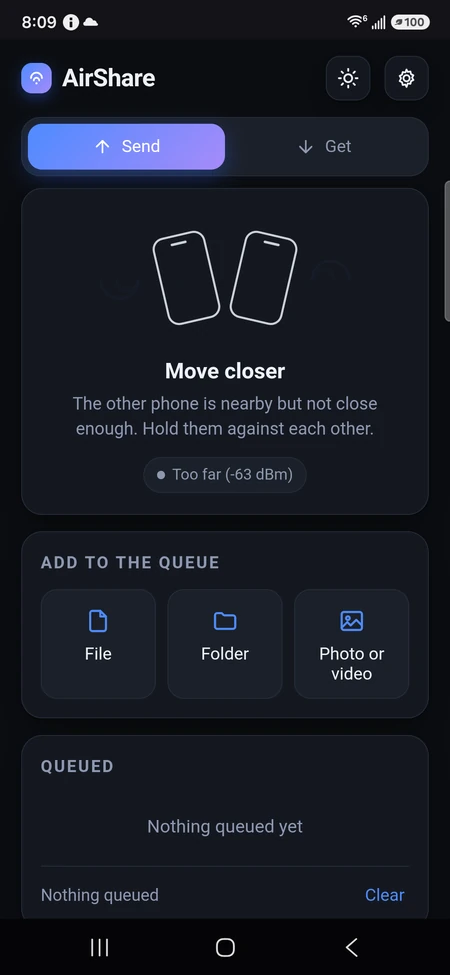
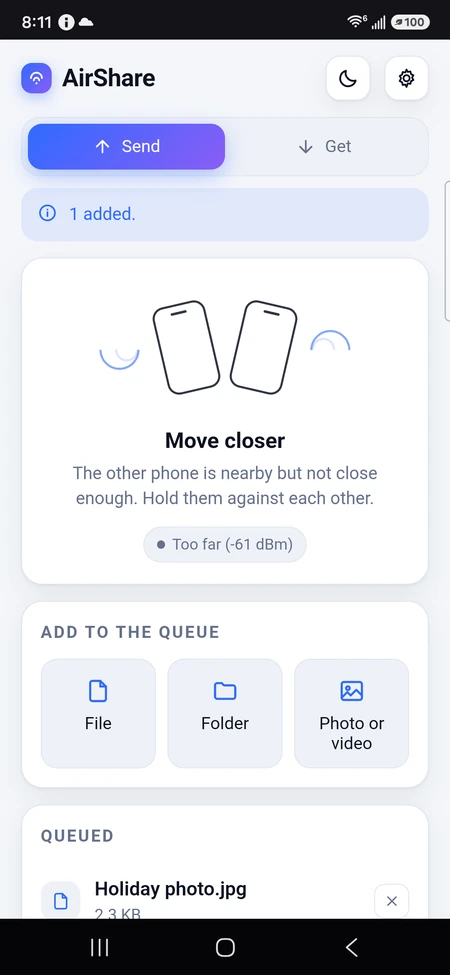
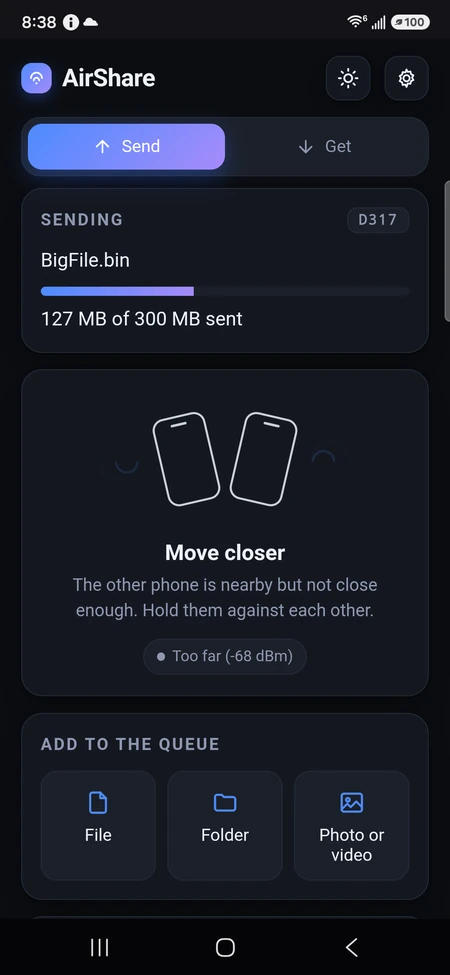
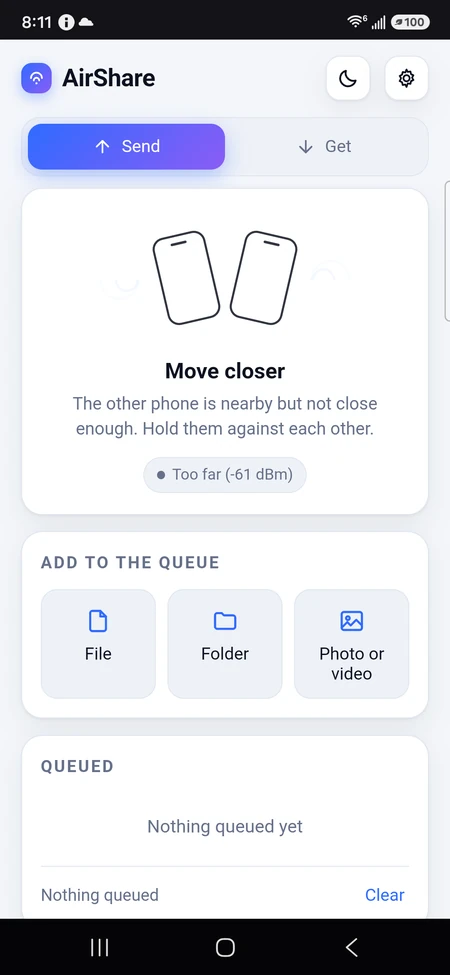
Bluetooth signal strength. Touching reads about -30 to -45 dBm, a hand's width away about -55, and across a room -70 or worse, so a strict threshold proves centimetres rather than "somewhere nearby". The app shows the live reading, so you can see it close as you bring them together. The moment it is close enough, the key crosses over Bluetooth and the files go over Wi-Fi.
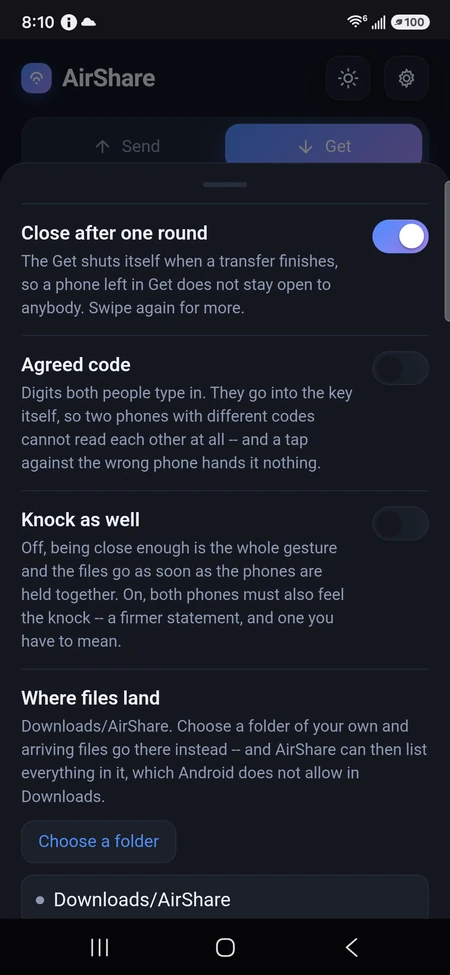
There is a switch for those who want more than that: turn on Knock as well and both phones must also feel the knock, within a fraction of a second of each other, before anything moves.
WHY WI-FI CARRIES THE FILES
Bluetooth is a control radio, not a pipe. It manages a few hundred kilobytes a second at best -- minutes for a single photograph, and hopeless for video. Wi-Fi is fifty to a hundred times faster. So the tap does the introduction and the agreement, and the files themselves go over the network both phones are already on, straight from one to the other.
AND WHEN THERE IS NO ROUTER AT ALL
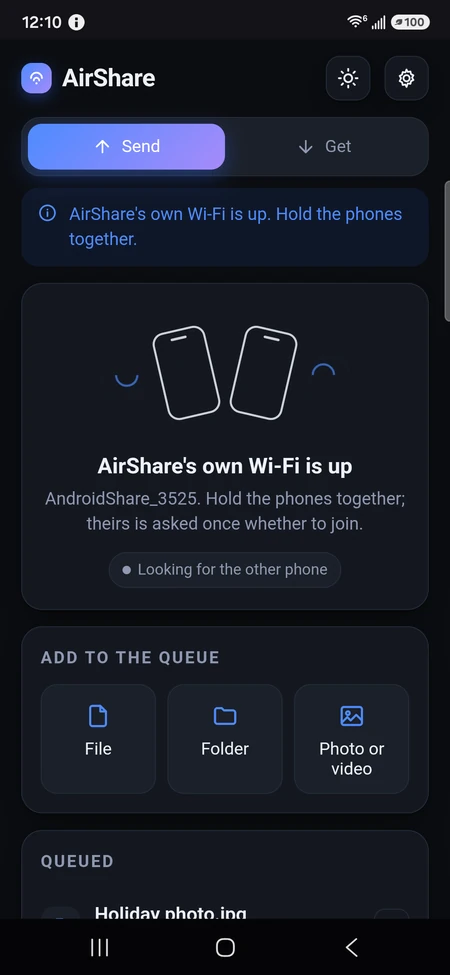
AirShare makes a Wi-Fi of its own. The sending phone raises a small private network -- no internet on it, nothing else on it -- and hands its name and password to the other phone at the tap, two centimetres apart. The other phone joins it and the files go across at Wi-Fi speed in a car park, on a train, or anywhere else with no router in sight. It is tried first, every time; if a hotspot cannot be raised, both phones fall back to the network they are already on.
HOW IT GOES, ON THE PHONE RECEIVING
The sending phone shows the name of the Wi-Fi it has raised -- something like AndroidShare_4088.
Which kind of Wi-Fi it is matters, and AirShare works it out rather than assuming. A phone running Android 13 or later raises its hotspot as WPA3, usually in the transition mode that accepts both WPA3 and WPA2; older phones raise WPA2. That detail crosses at the tap with the name and the password, and the joining phone asks for the security the network actually has -- on a transition hotspot it tries one and then the other. Asking for the wrong one means Android looks for a network that, as far as it is concerned, is not there: the question sits searching and finds nothing.
AirShare never asks for your location, and from Android 13 a list of the Wi-Fi networks around you counts as location -- so the app does not look at that list at all. It hands Android the name it was given at the tap and lets Android's own picker do the looking, which needs nothing from you but the one tap that allows it.
If joining genuinely fails -- one phone's radio doing only 2.4 gigahertz while the other's hotspot came up on 5, which no app is allowed to choose -- the two phones swap over: the one that could not join raises a network of its own, on a band its own radio certainly has, the other joins that instead, and the files go across that way.
The phone that is asked is the phone that joins, and in the ordinary direction that is the receiving phone. It says which network it is joining, by the same name the sending phone is showing, so the two can be compared at a glance before anything is allowed.
THE QUESTION ANDROID ASKS, AND WHAT TO DO WITH IT
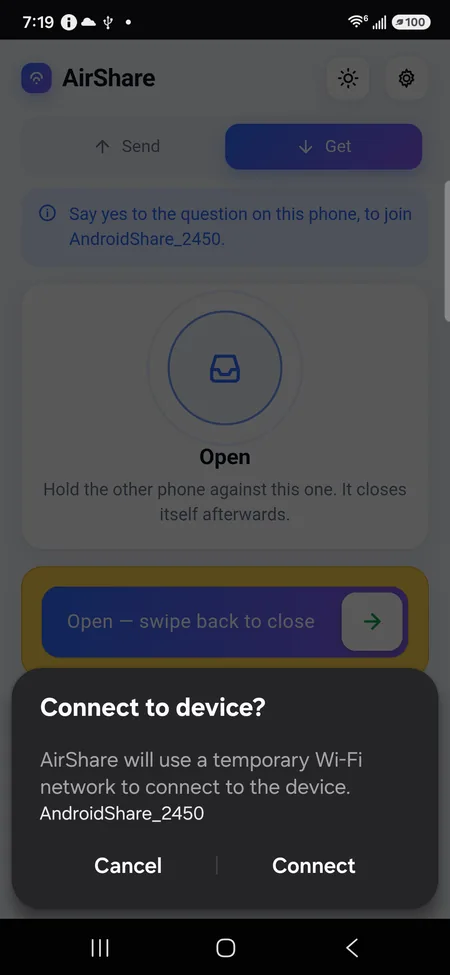
A box comes up on the joining phone, from Android itself and not from AirShare:
Connect to device? AirShare will use a temporary Wi-Fi network to connect to the device. AndroidShare_2450 Cancel Connect
Tap Connect. That is the whole of it, and the transfer begins within a second or two.
The name in the question -- AndroidShare_2450, or whatever it happens to be -- is the same name the sending phone is showing on its own screen. Compare the two before allowing it. They match, because it was handed across at the tap, two centimetres apart.
Why you are asked at all: Android does not let any ordinary app put a phone onto a named Wi-Fi by itself. Every join has to be agreed by the person holding the phone, every time. Nothing in AirShare can turn that off, and an app that could would be an app that could move your phone onto any network it liked.
EXPECT IT WHENEVER THERE IS NO ROUTER
With no Wi-Fi in reach -- a car park, a train, a field, a house whose router is off -- there is no shared network to send over, so AirShare makes one. Making one is precisely the case Android asks about. So on those transfers the question is not a fault or a sign that something went wrong; it is the normal middle of the job, and the only thing asked of you.
On a home or office network where both phones are already on the same Wi-Fi, AirShare uses that instead and no question appears at all. If you see it on one transfer and not the next, that is the difference.
ANSWER IT WHILE IT IS UP
Android waits about a minute and then gives up on its own, with "Couldn't connect. Check your network connection and try again". Nothing is broken and nothing has been lost -- the request simply expired.
AirShare does not give up there. The phone that could not join raises a network of its own instead, says so on screen, and the other phone is asked the same question. So after a timeout the box appears on the other phone: answer it on whichever phone is asking, and the files go across.
Two small things worth knowing. Android says "Searching for devices..." for a few seconds before it lists the network -- that pause is normal, and the thing to do is let it finish. And tapping the phones together again while it is searching starts a fresh request, which withdraws the one on screen: the question closes itself and says the app cancelled it. So hold them together once, put them down, and answer the question when it comes.
The sending phone has no internet while its own Wi-Fi is up, and the hotspot comes down the moment the transfer finishes, so the phone goes back to its usual network by itself.
Only the phone that was tapped is served. The password is made fresh for each hotspot and never travels further than the gap between the two phones, and the first thing the joining phone has to send is a sealed hello carrying that transfer's one-time token and its own address. Anything else that manages to be on that network is refused and the sender keeps listening for the one that was tapped.
WHAT IS ENCRYPTED, AND WITH WHAT
Everything, and with a key that exists for one transfer only.
At the tap each phone makes a fresh key pair and the public halves cross over Bluetooth, two centimetres apart for a fraction of a second. Both sides work out the same secret from their own private half and the other's public one, so somebody who recorded the entire exchange still cannot compute it. That secret keys AES-256 in GCM, which signs as it encrypts: a changed byte fails rather than arriving as rubbish. When the transfer ends the key is thrown away, and yesterday's capture is worthless.
A key built into the app goes into the derivation as well, so anyone on that Wi-Fi who is not running AirShare sees nothing but noise -- which is everyone, in practice. And if you want the one thing a tap cannot promise, there is an agreed code: digits both people type in, folded into the key itself. Two phones with different codes do not work out the same key and nothing can be read at all -- so a tap against the wrong phone hands it nothing.
THE GET IS SHUT UNTIL YOU OPEN IT
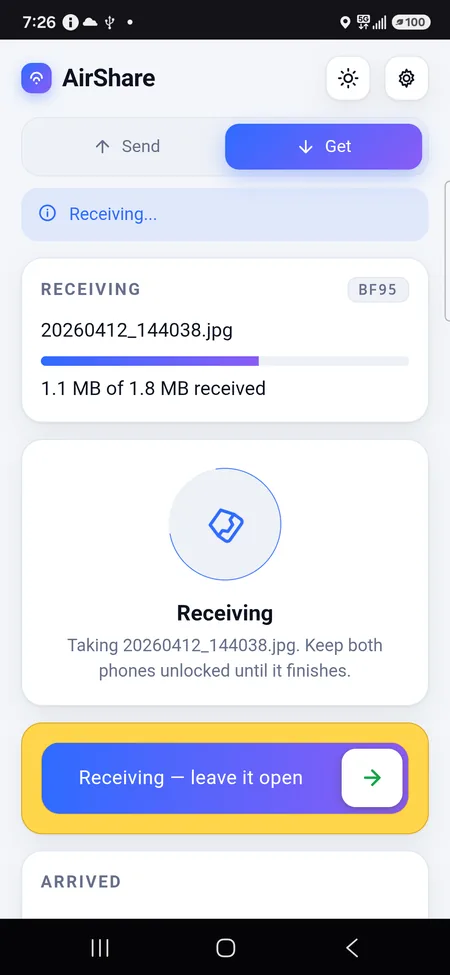
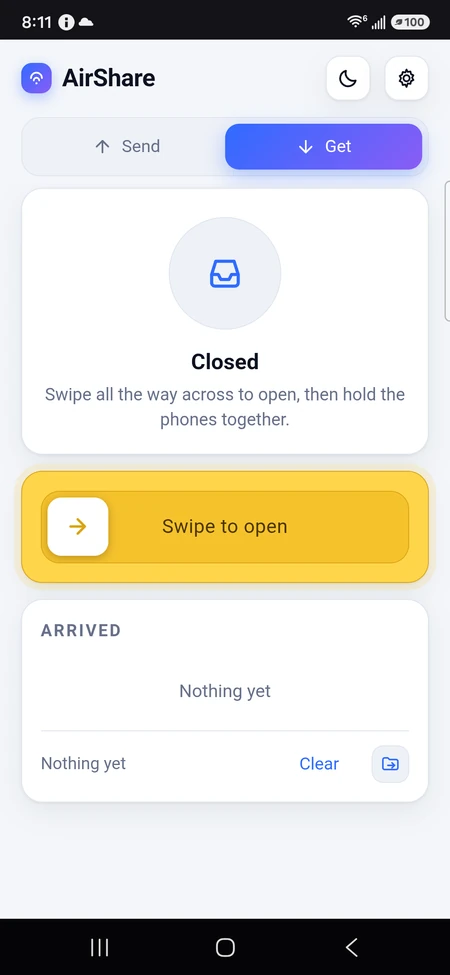
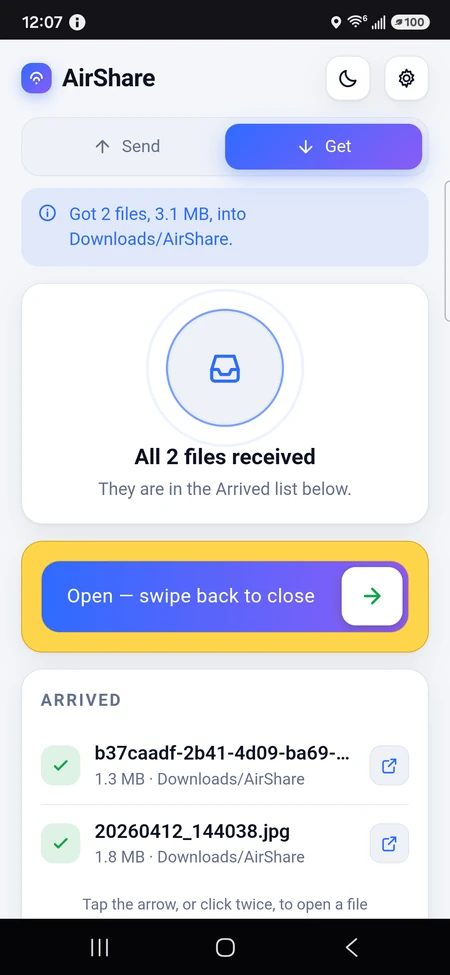
A phone in Get is closed. To open it you drag all the way across a wide yellow track -- the whole sweep, because a swipe that opens at the halfway point is a swipe a pocket can do. It closes itself again after one round, so a phone left in Get does not stay open to anybody, and a swipe back the other way closes it at any time. While files are arriving the track is held shut, so nobody interrupts a transfer by accident.
WHAT YOU CAN SEND
A file, or several. A folder, and everything inside it, with the paths it had in there. Or photos and videos from the camera roll. Android's own picker is what grants AirShare a hold on what you chose and nothing else, which is why it never asks for permission to read your storage.
WHILE IT IS MOVING
Both phones show the same thing: which file of how many, a bar, and the bytes so far against the total -- told by the header before a single byte moves. If the count stops climbing for more than a few seconds it says so in red rather than leaving a frozen bar to be read as progress. Both phones stay awake for the length of the transfer: a screen lock freezes the app, and a frozen app's socket dies partway through a large file.
WHERE IT PUTS THEM
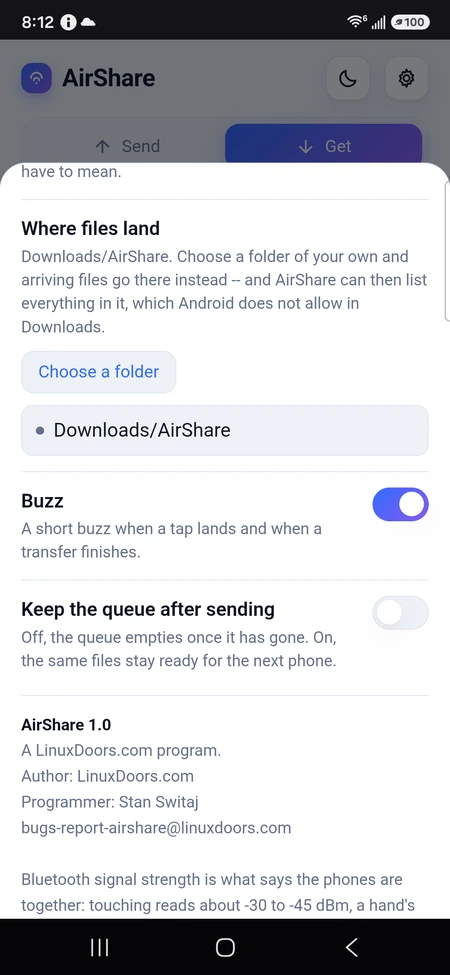
Downloads/AirShare, unless you choose a folder of your own -- and choosing one is what grants AirShare lasting access to it, so it can then list everything in that folder rather than only what it put there itself. Files that arrive are listed in the app with a green check, and open in whatever the phone uses for that kind.
NOTHING LEAVES THE TWO PHONES
No account, no advertising, nothing fetched from the internet, and no server in the middle. The page you are looking at is served by the app to itself on 127.0.0.1, and the files go directly from one phone to the other over your own network.
Light and dark, with a sun and a moon in the corner, and everything remembered between runs.
WHO MADE IT
A LinuxDoors.com program. Programmer: Stan Switaj. Bug reports to bugs-report-airshare@linuxdoors.com.
What it is for
Getting a file from one phone to another is absurdly hard for how often it comes up. Bluetooth takes minutes and often refuses to pair. Email has a limit you will hit on the first video. Cloud storage means uploading your file to a company's computer, waiting twice, and trusting them with it. A cable needs a computer in the middle.
AirShare is the gesture you would expect: hold the phones together and it goes. The tap is the authorisation -- nothing is sent to a phone that has not been opened and held against yours -- and the speed is the Wi-Fi's, so a three gigabyte video is minutes rather than an afternoon.
It suits the moment when two people are standing next to each other, which is exactly when the file is wanted and exactly when every other method is at its worst.
What it looks like
What you are downloading
| Package | com.AirShare.AirShare |
|---|---|
| Version | 1.0 (3) |
| Published | 24 September 2026 |
| Size | 37.4 MB |
| Built for | arm64-v8a, x86_64 |
| Needs | Android 7.0 and up |
| Price | $6.99 |
Checksum of the file
7842b1c0 d3fd9671 f53e5162 15a69614 69d8a528 07a107c8 6d7a53e9 fb5b9767
Signed by
c6e1595a 95c835cf b80d89f1 10c8ff0f bede4d52 ca3193f4 bd06b6dd 7d17ce60
Every version of this app is signed with the same key. If that second value ever changes, it did not come from the same hands — and Android will refuse to install it over the one you have.
Earlier versions
| 1.0 24 September 2026 | 37.4 MB |
|---|---|
| 1.0 24 September 2026 | 37.4 MB |