Installing an app from here
Every app on GoodsAppStore is an APK you download and install yourself. Android allows this on every phone and always has — it is called sideloading, and it does not need the phone rooted or unlocked or altered in any way. It asks your permission once, per browser, and then stays out of the way.
The five steps
-
Download the app
Tap Download APK on the app's page, in the phone's own browser. Chrome will say “This type of file can harm your device” — it says that about every APK ever downloaded, including the ones from Play. Tap Download anyway.
-
Open the file you just downloaded
Tap it in the download notification, or find it in Files → Downloads.
-
Let your browser install apps — once
The first time, Android stops and offers a Settings button. That leads to:
Settings → Apps → Special app access → Install unknown apps → Chrome → Allow from this source
This is the step people get stuck on, because the permission is given to the browser, not to the app you are installing. You grant it once and never see it again for that browser. Press back afterwards and carry on.
-
Read what it asks for, then install
Android shows the app's name and what it wants access to. This is worth actually reading — on any store. Then tap Install.
-
Play Protect may have something to say
On a Play Protect certified phone — nearly every phone sold with Google's apps on it — Google checks what you install. For an app it does not recognise it stops with “App blocked to protect your device”, and says why:
“Play Protect hasn't seen an app from this developer before. It may be unsafe.”
That is Google stating the actual reason: the app is unfamiliar, not that anything was found wrong with it. Every app is unfamiliar until it is installed.
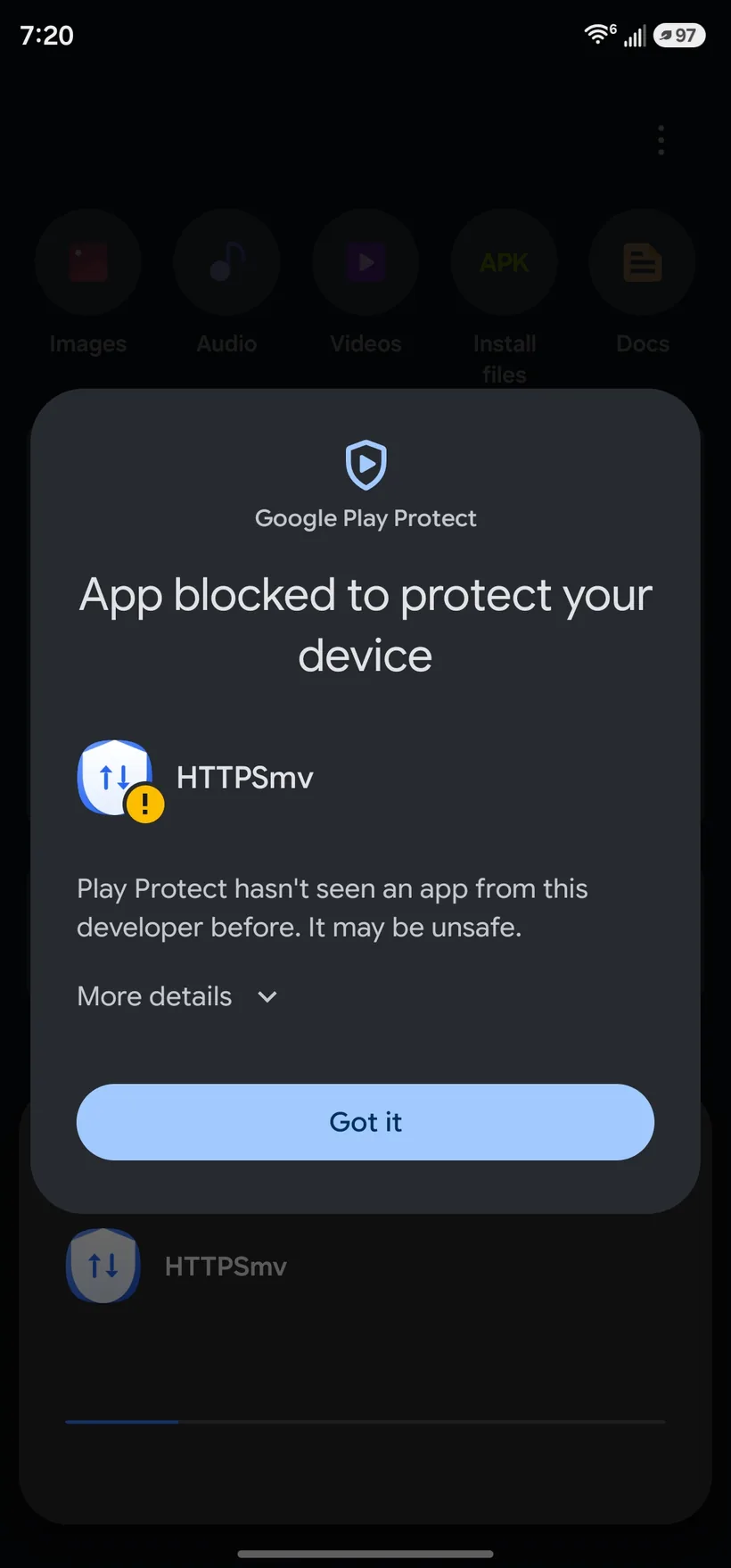
What you see first. Tap More details — the small link with the little arrow beside it. 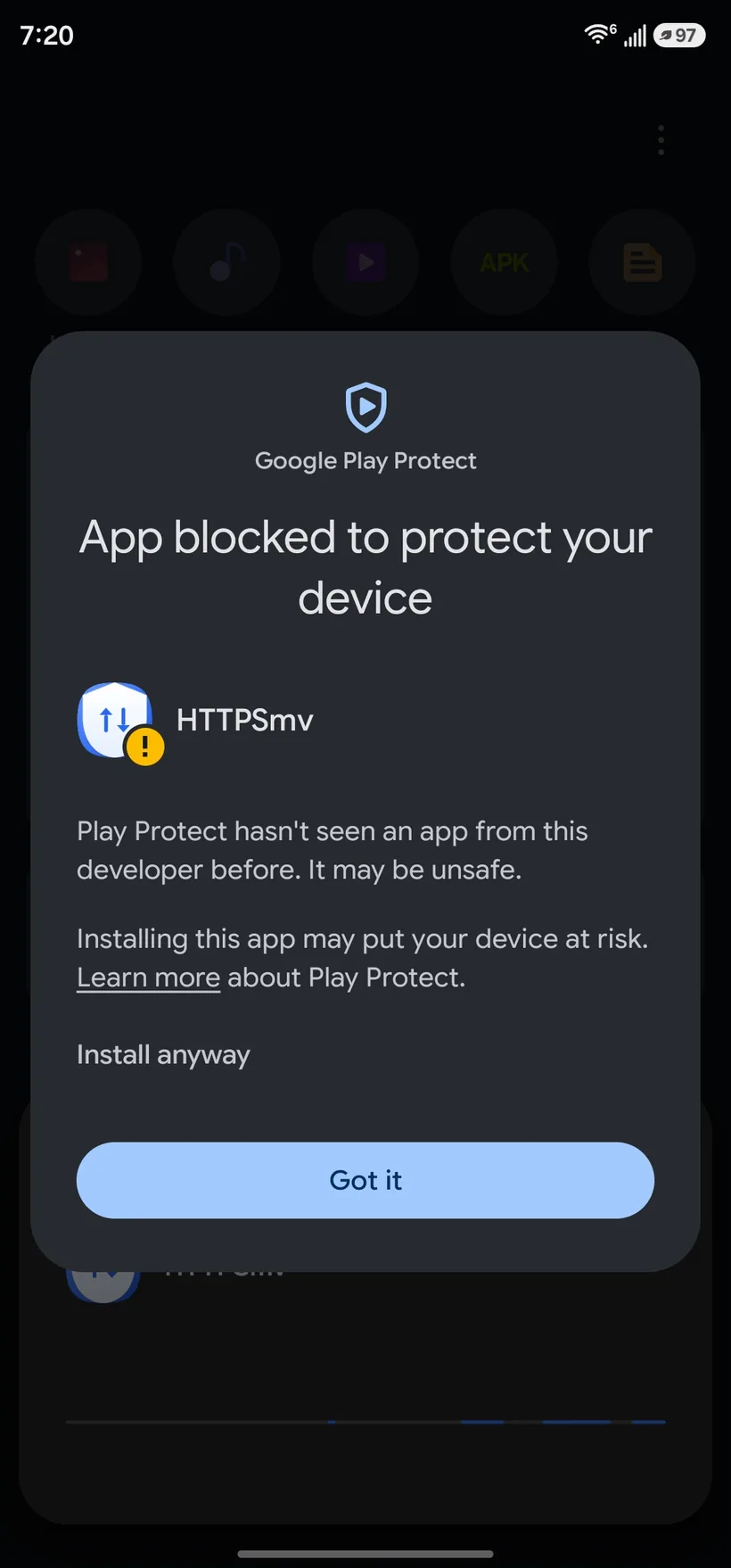
After tapping it. Install anyway has appeared. Tap those words. Do not tap the blue buttonThe only button that looks like a button says Got it, and it does not install anything — it closes the box and abandons the installation. Install anyway is plain grey text above it and does not look tappable. It is. That is the whole of what stops most people here.
If you would rather check the app than take anybody's word for it, the app's page here shows the checksum of the file and the fingerprint of the key that signed it. Those are things you can verify; familiarity is not.
Checking you got what we published
Every listing shows two long numbers, and they answer two different questions.
The checksum of the file tells you the download arrived whole and unaltered. On a computer:
sha256sum TheApp.apk
and compare it with the page. If they differ, the download was corrupted or interfered with — fetch it again.
Signed by is the fingerprint of the key that signed the app. That one matters over time: every future version of an app must be signed with the same key, or Android refuses to install it as an update. If that number ever changes on a listing, it did not come from the same hands.
Where the setting hides
Every maker moves it. If step 3 does not look like your phone:
Pixel, stock Android
Settings → Apps → Special app access → Install unknown apps
Samsung
Settings → Apps → ⋮ → Special access → Install unknown apps
Xiaomi, Redmi, POCO
Settings → Privacy protection → Special permissions → Install unknown apps
Android 7 and older
One switch for the whole phone: Settings → Security → Unknown sources
Honest answers
No. Rooting has never been needed to install an app from outside Play, and nothing here asks you to alter your phone.
No. An app installed this way is not watched by Play, so it will not update on its own. Come back here for a new version, and install it over the old one — your data stays where it is, because the signing key matches.
Because it cannot tell a good unknown app from a bad one, so it warns about all of them and leaves the decision to you. That is the honest position for it to take. What we can do from this end is publish the checksum and the signing key, so you can check what arrived is what we sent.
Yes. It is an ordinary app: hold the icon, or Settings → Apps → Uninstall.